2D vs Whiteboard Explainer for a Dentist or Doctor's Office
Your front desk answers the same patient questions every day. What happens in a root canal? Does an implant hurt?
A short animated video can answer them once, the same way every time. The hard part is the 2D vs whiteboard explainer choice, and this guide settles it.
Use whiteboard animation when a video must teach a process with three or more steps, like how an implant is placed or how to prep for a colonoscopy. Use 2D animation when the job is to welcome, reassure or sell, like a homepage video or a first-visit walkthrough. Many offices will want one of each.
Key takeaways
- Whiteboard teaches. 2D reassures and sells.
- Pick the style per video, not once for the whole practice.
- Make welcome and ad videos 30 seconds, and teaching videos 60 to 90 seconds.
- Studios charge $3,000 to $9,500 per minute of animation.
- Never show a real patient without written permission, and never promise results.
Which style suits a dental or medical practice better?
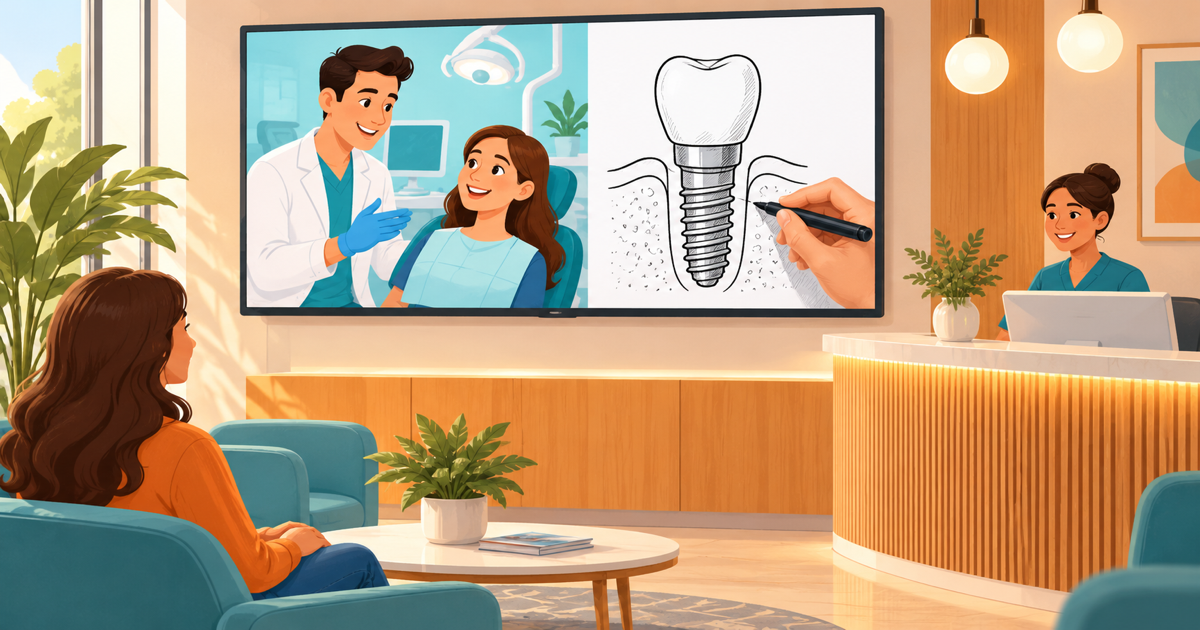
Neither style is better for every practice. Whiteboard animation suits videos that teach a treatment step by step, and 2D animation suits videos that welcome, calm or persuade a patient.
Whiteboard animation is a style where a hand sketches simple drawings on a white background while a voice explains each one. 2D animation is a flat, full-color style with cartoon characters, scenes and your brand colors, and it moves like a short TV cartoon.
Pexo's 2026 guide to explainer types calls whiteboard "relatively cheap" and best for educational content, internal training and multi-step processes. It calls 2D "the classic explainer format" and the default choice. Healthcare studio B2W draws a similar line: whiteboard for procedures and treatment explainers, character animation for patient education and treatment decisions.
Whiteboard always makes the viewer wait a moment for each drawing. That pause helps when a patient needs to follow steps, and it drags when you only want them to feel welcome.
For more background on each style, our whiteboard animation video guide covers when the hand-drawn look works, and our 2D vs 3D explainer comparison covers the 2D side.
Need an explainer video? Get a 30-second explainer for $297 → We write the script, record the voiceover and animate it, delivered in 7 days.
2D vs whiteboard explainer: how they compare in a practice
The table below compares the two styles on what a dental or medical office cares about: how each feels to a nervous patient, where it plays, how long it runs and what it costs.
| Factor | 2D animation | Whiteboard animation |
|---|---|---|
| Look | Full color, characters, your brand colors | Black or colored line drawings on white |
| Feel for a nervous patient | Warm and friendly, good for calming | Calm and teacherly, good for "here is what happens" |
| Best job | Welcome, first visit, payment plans, cosmetic offers, ads | Procedures, aftercare, prep steps, how a referral works |
| Length to aim for | 30 seconds (welcome and ads) | 60 to 90 seconds (teaching) |
| Waiting-room TV with sound off | Works with captions | Works well, since drawn labels carry meaning |
| Kids and families | Strong fit (characters, mascots) | Weaker fit |
| Social media ads | Strong fit | Weak fit (slow to start) |
| Studio price per minute | $4,500 to $9,500 | $3,000 to $5,000 |
| Price with us | $297 for 30 seconds (normally $497), $497 for 60 seconds | $397 for 60 seconds (normally $597), with a 30-second option on our whiteboard video page |
Yans Media's 2026 cost guide lists those studio ranges per minute. For a healthcare benchmark, B2W lists healthcare animated videos from $2,400 for 60 seconds.
Doing it yourself costs less cash. Atlabs' 2026 review of tools for dentists lists the whiteboard tool Doodly at $49 a month, but you still write, voice and time the video yourself.
The length row is the one people skip. Each whiteboard drawing takes a few seconds to appear, so a teaching video needs room, while a welcome or an ad has to land fast.
Which patient questions are best taught on a whiteboard?
Whiteboard animation fits any patient question that has three or more steps, a "before, during and after", or a part of the body people can't see. If you would sketch the answer on a notepad for a patient, it will work on a whiteboard.
Good whiteboard topics for a dental office:
- How an implant is placed, from scan to crown
- What happens during a root canal, step by step
- How clear aligners move teeth over the months of treatment
- How a sleep apnea mouth guard keeps the airway open
- Aftercare after an extraction, day by day
Atlabs makes the same point about aftercare, noting that a whiteboard sketch style suits step-by-step instructions such as post-extraction care.
The same test works in a medical office. A family doctor might teach colonoscopy prep, a physical therapist might draw the six-week plan for a knee, and a dermatologist might show how a skin check works.
There is a payoff for your team too. A Wyzowl survey, as reported by HubSpot's marketing statistics page, found 57% of video marketers say video has cut the number of support questions they receive. In a practice, those are the prep and aftercare calls your front desk takes.
Pro tip: ask your front desk to tally the questions they answer for one week. The top three are your first whiteboard videos.
When does 2D animation beat whiteboard for a practice?
2D animation beats whiteboard when the video needs to make a patient feel something, such as safe, welcome or excited about a result. Characters, faces and color do that job better than line drawings.
Pick 2D for these videos:
- A homepage welcome that says who you are and how to book
- A first-visit walkthrough for nervous patients
- A pediatric video with a friendly tooth mascot
- A payment plan or insurance explainer that needs to feel simple, not scary
- A 30-second ad for whitening, aligners or a new-patient special
The homepage is where 2D earns its keep. Wistia's 2026 State of Video recap reports that homepage videos get a 24% play rate, higher than product, contact or thank-you pages. That is the first impression of your practice, and you want it warm.
There is also a fair criticism of whiteboard to weigh. Pixel Bakery argues that the style peaked in the 2010s and can make a brand look cheap. That's a motion graphics studio's opinion, but it has a point for a cosmetic or high-end practice where the look is part of the sale.
A whitening ad that takes eight seconds to draw a tooth has already lost the scroller. Save the hand for patients who are already listening.
One more trade-off. Atlabs' review stresses keeping recurring characters visually identical across a patient education library, and two styles means two looks. If you use both, keep the same colors, logo and voice in each so they still feel like one practice.
2D vs whiteboard animation: choose per video in five steps
The 2D vs whiteboard explainer decision is made per video, not once for the whole practice. These five steps take about 30 minutes and leave you with a short list of videos, each with the right style next to it.
Step 1: List the questions your front desk hears most
Write down the ten questions patients ask most on the phone and at check-in. Include the worried ones, like "will it hurt?", not only the practical ones.
Step 2: Sort each question into teach or reassure
Mark a question "teach" if the answer has steps, and "reassure" if the answer is mostly about feelings, trust or money. Teach questions go to whiteboard, and reassure questions go to 2D.
Step 3: Decide where the video will play
Pick one main home for each video: the homepage, a treatment page, a waiting-room screen, a follow-up email after a treatment plan, or a social ad. Sound-off screens need captions.
Step 4: Set the length, then have a clinician check the script
Make welcome and ad videos 30 seconds, and teaching videos 60 to 90 seconds. Yum Yum Videos' length guide plans on 70 to 80 spoken words for 30 seconds and 140 to 160 for 60 seconds. Then ask a dentist, doctor or hygienist who did not write the script to read it out loud, so they catch a wrong step or a word that sounds like a promise.
Step 5: Review the style choice before you order
Watch one example of each style on a phone with the sound off, and ask two staff members which one feels like your office. If a "reassure" topic looks cold as line drawings, or a "teach" topic feels rushed in 2D, switch it now, before anything is animated.
Short welcome videos have the numbers on their side. Vidyard's 2024 benchmark data found 65% of viewers stay engaged to the end of videos under one minute. Teaching videos can run longer because patients watch them on purpose.
One practice, two videos: a worked example with scripts
Say you run a two-dentist family practice that wants more implant patients. Your front desk says new callers want to know if you're friendly, and implant patients want to know what actually happens.
That gives you two videos. A 30-second 2D welcome goes on the homepage, and a 60-second whiteboard implant video goes on the implant page and in the email you send after a consult.
Both scripts use the four parts that Biteable's script template lays out: hook, problem, solution and call to action. The script for a 60-second video comes in near 140 words, which matches the 140 to 150 words that Breadnbeyond's script guide recommends for one minute.
The 30-second 2D welcome (about 80 spoken words)
Hook (a nervous cartoon patient in a waiting room): "Not a fan of the dentist? You're not alone."
Problem (the patient checks a clock and frowns): "Lots of people put off a checkup because they don't know what to expect, or what it will cost."
Solution (a smiling dentist character waves): "At (practice name), we explain every step before we start, we tell you the cost up front, and you can ask us to pause at any time."
Call to action (your logo and phone number): "New patients can book a first visit online in about two minutes. Or call us at (phone), and we'll take it from there."
The 60-second whiteboard implant video (about 140 spoken words)
Hook (the hand draws a smile with a gap): "Missing a tooth? You don't have to live with the gap. An implant may be one way to fill it."
Problem (a tooth gap, then nearby teeth leaning in): "A gap is more than a looks problem. Over time, the teeth next to it can lean in, and chewing on that side can get harder."
Solution, step 1 (a scan of the jaw): "First, we take a 3D scan of your jaw, so we can plan the exact spot."
Solution, step 2 (a small post going into the bone): "Next, a small post is placed in the bone. It needs time to heal, and your dentist will tell you how long."
Solution, step 3 (a crown clicking on top): "Then we fit a crown made to match your other teeth."
Aftercare (a toothbrush and floss): "After that, you brush and floss it like your other teeth, and we check it at your regular visits."
Payment (a simple calendar of payments): "Ask us what your insurance may cover, and about payment plans."
Call to action (an arrow to the phone number): "Book a consult, and we'll tell you if an implant could be right for you."
Check every step against how your own practice does the procedure. Your dentist's words beat any template.
Want something bigger? Book a free 30-minute video call → We plan your custom video with you and send a fixed quote within 24 hours.
What can a practice video show without breaking patient rules?
A practice video can show drawn characters, the general steps of a treatment and your real payment options, as long as nothing is false or misleading. Real patients, their faces, names or stories need written permission first. This isn't legal advice, so check your own practice, board and compliance rules before you publish.
Privacy comes first. HIPAA is the US federal law that protects patient health information. In 2016, the US Department of Health and Human Services' Office for Civil Rights settled with Complete P.T., Pool & Land Physical Therapy, a Los Angeles provider, for $25,000 after it posted patient testimonials with names and face photos without the permission HIPAA requires. The settlement also required a corrective action plan.
Claims come second. The American Dental Association's Code of Ethics, Section 5.F, says no dentist shall advertise in a way that is false or misleading in any material respect. Its advisory opinion 5.F.2 warns against statements likely to create an unjustified expectation about results.
The ADA code binds its member dentists. Medical offices follow their state medical board and general truth-in-advertising rules instead, so check which rules apply to you.
In practice, that comes down to a few habits:
- Use drawn characters, not real patients, unless you have signed authorization.
- Say "can" and "may", never "will" or "guaranteed", about results.
- Keep "before and after" scenes general, not tied to a real case.
- Match every step to how your practice really does the treatment.
Animation also means nobody films in your operatory, so a chart or X-ray can't slip into the background by accident. Our healthcare explainer guide for small clinics has a fuller checklist for clinic scripts.
Can you get both styles made for one practice?
Yes. We make both 2D explainers and hand-drawn whiteboard videos, and a common setup is a short 2D welcome plus a longer whiteboard treatment video.
Prices for both are in the table above. Every video includes the script, a human voiceover and the animation, delivered in 7 days with 3 rounds of changes and a money-back guarantee. Custom videos start from $1,299, planned with you on a free 30-minute call.
We've made 14,000+ videos for 13,500+ businesses since 2013. Still, a video won't fix a practice that's hard to book. If patients can't get through on the phone or find a slot online, fix that first.
Frequently asked questions
Is whiteboard animation a type of 2D animation?
Yes. Whiteboard animation is a line-drawn subtype of 2D animation, where a hand appears to draw each picture on a white background. People usually say "2D animation" to mean the full-color cartoon style, which is why the two get compared.
Can whiteboard animation be in color?
Whiteboard animation can use color, and many videos add colored markers or shading to the drawings. The background stays white or very light, since that plain board is what makes the style. A splash of your brand color helps a whiteboard video match your other materials.
Does whiteboard animation look outdated for a modern dental office?
Whiteboard animation can look dated as a homepage or ad video, where patients expect color and polish. For teaching a procedure, the plain style reads as calm and clear, so it still works on a treatment page or a waiting-room screen.
Should a pediatric dentist use whiteboard or 2D animation?
A pediatric dentist should usually use 2D animation, because children respond to characters, color and a friendly mascot. Whiteboard can still help with a parent-facing video, such as explaining sealants step by step.
Which style is better for explaining dental implants?
Whiteboard animation is usually better for explaining dental implants, because the treatment has clear steps: scan, post, healing and crown. A short 2D video works better for the ad that gets a patient to ask about implants in the first place.
How much does a whiteboard video for a dental office cost?
A whiteboard video for a dental office costs $3,000 to $5,000 per minute at a studio, according to Yans Media's 2026 cost guide. Our 60-second whiteboard video is $397 (normally $597), with script and voiceover included, and a 30-second option is on our whiteboard page.
Picking your first video
The 2D vs whiteboard explainer question has a simple answer once you look at the job. Whiteboard teaches a process step by step. 2D welcomes, calms and sells.
Start with the questions your front desk answers every day. Sort them into teach and reassure, pick where each video will play, and use one length rule: 30 seconds for welcomes and ads, 60 to 90 seconds for teaching.
Before anything goes live, have a clinician check the script, keep real patients out unless they've signed permission, and never promise a result.
The goal is patients who arrive already knowing what to expect, and a front desk that spends less time repeating itself. Ready to make your first one?
Ready to get your own video made? Order a 30-second explainer for $297 and have it in 7 days, or book a free call if you want a custom video from $1,299.
Related Reading
- 2D vs 3D Explainer Video: Cost, Time and Which to Choose: Not sure if your business needs 2D or 3D animation? See real 2026 studio…
- Healthcare Explainer Video Guide for Small Clinics: Plan a healthcare explainer video for your clinic: what to explain first,…
- Real Estate Whiteboard Animation: What to Explain First: A real estate whiteboard animation explains your process, not your listings.…
- Whiteboard Animation Video: When It Works and What It Costs: A whiteboard animation video works best when you teach a hard idea. See when…
- Explainer Videos from $297 →: Professional animated explainer videos delivered in 7 days.
Want a whiteboard video for your business?
We write the script, record the voiceover and draw the hand-drawn animation. Delivered in 7 days, with 3 rounds of changes and a money-back guarantee.
Get My Whiteboard Video — $197 →