UGC Video Ads · 7 minute read
Should I Turn Off Advantage+ Creative Enhancements on Video?
Should I turn off Advantage+ creative enhancements on a talking ad? Keep, check or turn off calls for each one, in Meta's own words, plus the preview steps.
Why listen to us? We have been making video ads since 2012. That is 16,000+ videos for 13,500+ businesses, from plumbers to dentists.
Meta keeps a team of little helpers that can touch up your ad before anyone sees it. Some may start work without being asked, and Meta says so on its own help page.
Should I turn off Advantage+ creative enhancements on a talking video ad? Our view: check every one, and turn off the ones that touch the voice or the words. That means Translations (AI), Video subtitles (AI) when your words are already on screen, and Text improvements (AI) if it covers them. Keep the rest only if the preview looks right.
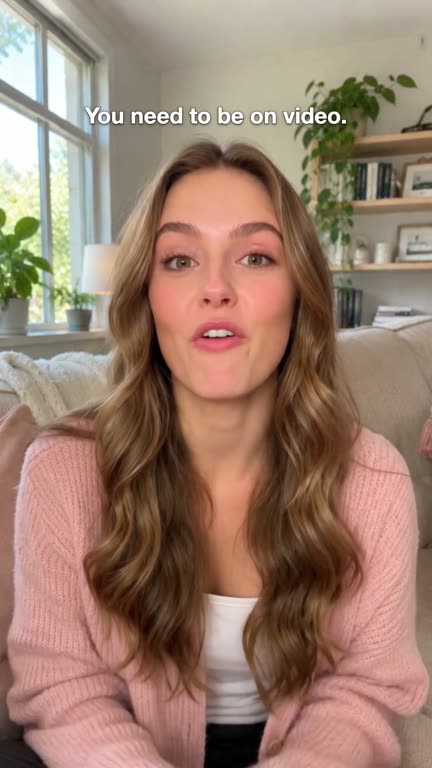
Or start with an ad that needs less help. A Yapper ad from 30 Second Ad Club (30 Second Productions) is a 30-second talking video ad with an AI presenter. Real people write and check every one, and it arrives finished with her voice, words on screen and your logo, so there's little left for Meta to add. It's $197 one-time.
Here's our Yapper ad for the Holiday Song Club.
Want one about your business? Get your Yapper ad.

Meta's helpers are built for unfinished ads
Meta's About Advantage+ creative page (checked November 2026) says: "Some enhancements may be turned on by default, but you can turn them off at any time." It adds that the media and text you upload "may be adjusted", while keeping "the core message of your campaign."
That's a fair deal for a bare photo of a sofa.
A talking ad isn't a bare picture. It's 30 seconds of someone saying your exact words. The words are the ad. So is the voice.
Meta's helpers are the keen uncle at a wedding. Great at moving chairs. Keep him away from the microphone.
Get a talking video ad made for your business for $197 → A real-looking presenter sells for you. We write the words and make the video. You just say yes.
Should I turn off Advantage+ creative enhancements on a talking ad?
Turn off the ones that touch the voice or the words, check the ones that change the picture, and skip the image-only ones. Here are 10 of Meta's names with Meta's own notes; the calls are our view, not Meta's.
| Enhancement (Meta's name) | What Meta's page says (Nov 2026) | Our call for a talking ad | In a 30 Second Ad Club Yapper ad |
|---|---|---|---|
| Translations (AI) | "Voice translations are available for single video ads with voiceover" | Turn off. You can't check a language you don't speak | English only for now |
| Video subtitles (AI) | Subtitles "based on the audio", for "single video ads with English voiceovers" in Instagram Reels | Turn off if your words are already on screen | Words already on screen |
| Text improvements (AI) | Shows phrases from your ad copy "on or around your ad creative" | Check. Turn off if it covers your words or her face | Words already on screen |
| Video touch-ups (AI) | Crops or expands video "to fit a 9:16 or 4:5 aspect ratio" | Check. Keep only if every preview shows her whole face | Made vertical already |
| Add video effects (AI) | "higher contrast ratios and more vibrant colours" | Check. Turn off if her skin or your logo looks wrong | Checked by real people |
| Enhance CTA (AI) | Can swap your link sticker for "one of our pre-written CTAs", in Stories | Check. Keep if the button matches what she asks for | Next step said at the end |
| Add music (AI) | Meta's note lists "single image and carousel ads" | Image ads, per Meta. Hear music in a video preview? Turn it off | Arrives with her voice in |
| Add animation (AI), Visual touch-ups (AI), Add overlays (AI) | Notes say "only available for single-image ads", "static single-image ads" and "single image ads" | Image ads only, per Meta. Nothing to do on a video | Not needed |
Quotes are from Meta's UK page. Sizes by placement: our Facebook video ad size guide.
Leave her voice alone
The voice is where a talking ad lives or dies. Here's one we wrote for this post (not a real ad).
The plumber
Your water heater isn't dead. Maybe.
Hi, I'm with [Your Name] Plumbing in [Your Town]. No hot water this morning? Before you buy a new tank, let us look. We'll tell you straight if it needs a part or a new one. Tap Book now and pick a time today.
On screen: every word, your logo at the end. Button: Book now.
Now run Meta's helpers over it.
Translations (AI) can put her voice into another language. Jon Loomer leaves it on, but in his list of enhancements he says it "does require some trust that the translation is applied correctly." In our view, that's a lot of trust.
Video subtitles (AI) writes words from the audio, so with yours already on screen, you get every line twice (more on captions here). Text improvements (AI) can drop your ad copy right on top of what she's saying.
Our call on music: if you hear a track under her in a preview, switch it off. Nobody needs a beat under a plumber (which tracks you can use).
Here's our Yapper ad filmed in a home studio.
How do I check Advantage+ previews and switch enhancements off?
Open the ad in Meta Ads Manager, look at every Advantage+ creative preview and switch off anything that touches the voice or the words. Meta's help page has no numbered list, so Steps 1-4 follow Jon Loomer's walkthrough (checked November 2026) and are his view.
Step 1: Upload the whole ad
Video and words go in before you look at any preview, so you see the real ad.
Step 2: Open the Advantage+ creative section
Scroll to Advantage+ Creative and click Edit to preview the enhancements.
Step 3: Flip through every preview
The first preview is your original. Click through the rest for each placement, watching the presenter's face, your words and your logo.
Step 4: Switch off what touches the voice or words
Loomer says an "All Optimizations" slider turns everything off at once, or you can go one by one. Our view: one by one, using the table above.
Step 5: Check again right before you publish
JumpFly says, in its view, that replacing the creative, duplicating an ad or editing it may make some enhancements show as selected again. A wrong word in front of your whole town costs more than a look.
Watch our Yapper ads → Click any video to watch with sound.
Will an enhancement put an AI info label on my ad?
Meta labels ads made with some of its own AI features. Its AI info help page (checked November 2026) says: "We will automatically apply an AI info label when you use features such as Background Generation, Image Generation or Add Animation to create or significantly edit an image or video."
Meta adds that "you will see a message during the ad creation process" first, so read that screen. Our presenter is made with AI; here's what Meta's and TikTok's own pages say about AI ads.
What's left for Meta to finish?
The more finished the upload, the less Meta has to change.
| Option | Cost to make | Who adds voice, words and end card | Left for Meta | Your work |
|---|---|---|---|---|
| Your phone | Your time | You | Plenty | Write, film, edit |
| AI avatar app | HeyGen Creator: $29 a month, per HeyGen (Nov 2026) | You, in the app | Whatever you didn't finish | Write, prompt, edit, check |
| Marketplace gig | Varies by seller | The seller | Depends what comes back | Lots of back and forth; in our view, quality is often uneven |
| 30 Second Ad Club Yapper ad | $197 one-time | Our team | Little to nothing | 2-minute form, say yes, then check Meta's preview |
We write the words or use yours. You approve a picture for each part, with 1 round of changes included, and it's ready 72 hours after you say yes. You own the ad, but we don't run ads, so you or your ad person puts it live. Every order comes with your own Ad Club account for your next one.
Here's our Yapper ad for Song Ads.
Want one too? Get your Yapper ad.
Frequently asked questions
Does turning enhancements off hurt my results?
Nobody can say. AdLibrary (checked November 2026) writes: "There's no published Meta figure isolating what disabling a single creative enhancement costs in performance." Their view: test one change at a time.
Is the Yapper presenter a real person?
No. She's made with AI and looks and sounds real, and real people at 30 Second Productions write and check every video.
Are Advantage+ creative enhancements on by default?
Some can be. Meta's About Advantage+ creative page (checked November 2026) says: "Some enhancements may be turned on by default, but you can turn them off at any time."
The short version
Meta's helpers finish unfinished ads, and a talking ad is already finished. Our call: let Meta fit the picture to the screen if the preview looks right, and keep it away from her voice and her words.
You could write it, film it and add the words yourself. For a busy owner, our done-for-you Yapper ad is the best pick: real people write and check it, it arrives finished, and your jobs are saying yes and a quick look at Meta's preview.
No ad can promise sales or views, ours included. But yours will say what you meant.
Want an ad that talks for you? Get your Yapper ad for $197: your words, your logo, made for you in 72 hours, with a money-back guarantee.
Related Reading
- How Long Should a UGC Ad Be? Why We Pick 30 Seconds: How long should a UGC ad be? About 30 seconds. See what TikTok and Meta say,…
- Do I Have to Label AI Ads? TikTok and Facebook Rules (2026): Do I have to label AI ads? TikTok gives you a toggle and Meta says it labels…
- Do I Need a TikTok Account to Run TikTok Ads? Yes, Since 2026: Do I need a TikTok account to run TikTok ads? Yes, for almost all new…
- How Many Words Is a 30 Second Ad Script? Why 75 Beats 90: How many words is a 30 second ad script? About 75 spoken words. See 15 and…
- Yapper Ads for $197 →: A 30-second talking video ad with a real-looking AI presenter, made for you in 72 hours.

Get a real-looking yapper ad for just $197!
She talks to the camera like a friend telling a friend about your business. You just say yes.
Get Started — $197 →