UGC Video Ads · 8 minute read
Boosted Post vs Ads Manager on Facebook: Which Gets Calls?
Boosted post vs Ads Manager on Facebook: boosting buys reach and likes, Ads Manager can ask for calls. See the side-by-side, a pick-one guide and steps.
Why listen to us? We have been making video ads since 2012. That is 16,000+ videos for 13,500+ businesses, from plumbers to dentists.
Boosting a post doesn't buy a cheaper, lighter ad. It makes a real ad, in the same auction and with the same billing as Ads Manager, says Relevant Audience (October 2026). So boosted post vs Ads Manager comes down to what you ask Facebook for.
Boosting is for quick reach and likes on a post you already have. Ads Manager is for calls, leads and sales, because it lets you ask Facebook for those, test videos side by side and see what worked. If the phone matters more than the likes, use Ads Manager.
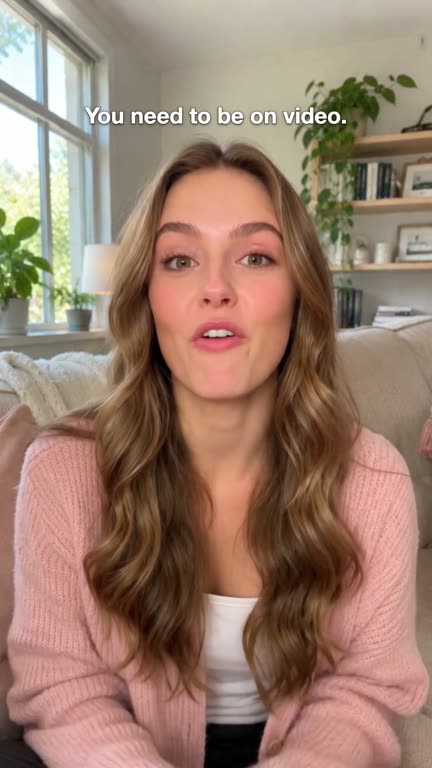
A Yapper ad is a 30-second talking video ad where a real-looking presenter talks to the camera like a friend telling a friend about your business. The presenter is AI, not a real person. Real people write and check every video.
At 30 Second Ad Club, the done-for-you ad team from 30 Second Productions, we write the words, you approve each part, and it's ready 72 hours after you say yes. One ad is $197, with a money-back guarantee.
Why not film it yourself? You could, between jobs. But the first 3 seconds are the hook, and that's the part we write for you: a hook up front, the problem and the fix in the middle, the next step at the end. It works with boosting or Ads Manager.
Here's a Yapper ad we made for one of our own services.
Get a talking ad like this for your business.

Facebook only finds what you ask for
Facebook is a good dog. Throw a ball and it brings back the ball, not the slippers you secretly wanted.
Boosting only has a few balls to throw. On Instagram, Relevant Audience says boosting offers goals like profile visits, website visits and messages. On Facebook you pick one, or let the system pick for you. Ads Manager adds goals built for leads and purchases.
Relevant Audience warns that engagement goals find people who like posts, not always people who buy. Later (August 2026) says it more gently: "A boosted audience tends to be a more passive one."
Likes don't fix leaks.
A dentist doesn't need a pile of hearts under her post. She needs the chair filled on Tuesday.
Later calls boosting "the express lane" and Ads Manager "the control room." The express lane is great, if all you came for was milk.
Get a talking video ad made for your business for $197 → A real-looking presenter sells for you. We write the words and make the video. You just say yes.
Boosted post vs Ads Manager: what's actually different?
A boosted post is a post from your Facebook Page that you pay to show to more people. Ads Manager is Meta's full tool for building ads, where you set the goal, audience, placements and budget yourself.
Meta has its own help page on the difference between boosted posts and Meta ads. The side-by-side below comes from Relevant Audience (October 2026) and Reporting Ninja (January 2024), plus where our ad fits.
| Feature | Boosted post | Ads Manager | Yapper ad from 30 Second Ad Club |
|---|---|---|---|
| Where it starts | A post already on your Page | A new ad you build | A finished video file we make for you |
| Goals | A short list (profile visits, website visits, messages on Instagram), or let the system pick | Adds leads and purchases | Built to ask for the call or booking: next step at the end |
| Who sees it | Location, age, gender, interests, or a suggested audience | Adds exclusions and Lookalike audiences (people like your customers) | You or your ad person pick the audience |
| Where it shows | You can't choose | You choose | Vertical, with words on screen for sound off |
| Testing | No built-in A/B test | Test several videos in one campaign | A second Yapper ad gives you something to test against |
| Change it later | Audience, budget and days, not the video | You can change the video | 1 round of changes before it's done |
| Best for | More eyes on a post that's already working | Calls, leads and sales | Owners with no time to make the video |
The row that bites is "change it later." Relevant Audience says that once a boosted post is reviewed, you can change the audience, budget and length. You can't change the text, images or video.
So if the video is weak, you're stuck paying to show it.
Is boosting a post a waste of money?
Boosting a post isn't a waste of money if you want more eyes on a post that's already doing well. It's a poor buy if you want the phone to ring. Later says boosting works best on posts that already do well without paid help, and Reporting Ninja (January 2024) says you can start from "as low as $5 per day."
The waste comes from boosting the wrong post. A post with three likes, two from family, won't get better because you paid for it.
And lots of small boosts each get too few results for Facebook to learn who buys, says Relevant Audience. Ten drips, no flow.
Likes are applause. You can't pay a plumber with applause.
Which one should a plumber or dentist pick?
A plumber or dentist who wants calls or bookings should use Ads Manager with a leads goal and one 30-second talking video. Boosting only makes sense for a post that's already getting attention, when you want more people in town to see it.
Say you run a plumbing company. You want calls from people a short drive away.
Say you run a dental practice, and a video you posted is getting shared. Fine, put a little money behind it for reach. Then build your new-patient ad in Ads Manager.
We wrote these two talking ads for this post. They aren't real ads and have no results behind them. Swap in your own name, town and offer.
The plumber
If your water heater sounds like a drum kit, watch this.
That banging isn't "just old age." It's telling you something. Usually something expensive. [Your Name] Plumbing comes out the same day in [Your Town]. We'll tell you straight: fix it, or replace it.
On screen: your star rating and your town. Button: Call now.
The dentist
Haven't seen a dentist in a while? You're not in trouble.
Nobody here is going to lecture you. New patients at [Your Practice] start with a check-up and a clean. Evening slots, so you don't miss work. Tap below and pick a time.
On screen: your practice name and town. Button: Book now.
Here's one of ours, set in a home studio.
Watch our Yapper ads → Click any video to watch with sound.
Run the same talking ad either way
One video file works for both routes. Boosting is steps 1 and 2. For Ads Manager, do step 1, then steps 3 to 6.
Step 1: Post the video with one clear line
Add one short line that says who it's for. Our guide to the Facebook ad character limit covers how much text shows, and how long a Facebook video ad should be covers length.
Step 2: Pick a goal, an audience, a budget and the days
Pick messages or website visits, not engagement, if you want people to get in touch.
Step 3: Start a campaign with a leads goal
A campaign is the top level in Ads Manager, where you pick the goal. Pick leads for calls or forms, then set your area.
Step 4: Use your post or upload the file
Meta has a help page on creating ads from existing posts in Ads Manager. Or upload the video file fresh.
Step 5: Put a second video next to it
Put two talking ads side by side with the same budget, each with a different hook, and keep the one that brings more calls. Our guide on how many video ads to run at once covers the rest.
Step 6: Count calls, not likes
The Meta Pixel is a bit of code on your website that tells Meta when someone books or buys. Relevant Audience says Ads Manager tracks results with it, while boosting has limited tracking. Ask every caller where they saw you, too.
Frequently asked questions
Can I change a boosted video after it goes live?
No. Relevant Audience (October 2026) says only the audience, budget and length can change after review. To use a new video, post it and start again.
Do boosted posts cost more than Ads Manager ads?
Not in the auction. Boosted posts and Ads Manager ads go through the same auction and billing, per Relevant Audience (October 2026). A boosted post can start at $5 a day (Reporting Ninja, January 2024), and it is still a real ad. You just get fewer goals to pick from.
Is the presenter in a Yapper ad a real person?
No. The Yapper presenter is made with AI and looks and sounds real. Real people at 30 Second Productions write and check every video, and you approve each part.
Will you run the ad for me?
No. We make the ad, and you own it. You, or whoever runs your ads, puts it live, by boosting or in Ads Manager, and sets the budget.
The short version
Facebook gives you what you ask for. Boosting asks for attention. Ads Manager can ask for calls. If you want the phone to ring, ask for the phone.
The harder part is the video, because no button can fix a dull one.
You could write, film and edit it yourself, between jobs. For a busy owner, our done-for-you team is the best pick. We write it, make it and check it, and you approve a finished ad, with no app to learn.
No ad can promise calls, ours included. But for $197, you'll be paying to show something worth watching.
Want an ad that talks for you? Get your Yapper ad for $197: your words, your logo, made for you in 72 hours, with a money-back guarantee.
Related Reading
- How Many Video Ads Should I Run at Once? Facebook vs TikTok: How many video ads should I run at once? Run 3 to 5 really different ads per…
- Facebook Ad Character Limit (and TikTok's): What to Write: The Facebook ad character limit, from Meta: 27 for a Feed headline, 50-150…
- Video Ad Thumbnail: Pick Your Cover on Facebook and TikTok: Who picks your video ad thumbnail on Facebook and TikTok, how to change it…
- Facebook Ad Call to Action Button: Pick the Right One: Which Facebook ad call to action button fits your goal? See which objective…
- Yapper Ads for $197 →: A 30-second talking video ad with a real-looking AI presenter, made for you in 72 hours.

Get a real-looking yapper ad for just $197!
She talks to the camera like a friend telling a friend about your business. You just say yes.
Get Started — $197 →